An average SalesLoft customer has about 10 sales reps using the software. At that size, customers are extremely happy. However, what happens when you have more than 100 users on the product?
For them, it’s chaos.
They have 100 reps creating dozens of Cadences. It’s difficult to determine who is running what, and there is no visibility into them.
Essentially, what works great for small teams doesn’t work for large teams. We need to figure out what to do—Cadences is the reason customers buy SalesLoft. It is our flagship feature.
I’ve been at SalesLoft since March. It has been wild to see the speed of execution. I’ve worked on a handful of smaller features—adding custom sentiments and dispositions, updating the add to cadence flow—but this feature was much bigger.
Team
Aly Merritt was our PM and helped organize customer communication. We also had a talented team of engineers—Justin Barber, William Hoffman, Sam Inyang, and Atiyah Thomas.
Fora Shah was our QA engineer. We could not have shipped such a polished V1 of Team Cadences without her!
I also have to thank our product and design leads—Lauren Langley and Butler Raines—for having extreme faith in me. They threw me into the deep end on this project and gave me a chance to prove myself on a critical feature for the business.
Research and Planning
There were two approaches we considered when designing this feature—sharing and managing.
Shared Cadences would be familiar to anyone who has used Google Docs. All cadences would live on the same level, and the owner would grant permission (Run or Edit and Run) for others to use the Cadence.
Managed Cadences, on the other hand, would put Cadences in the hands of managers and SDR leaders. This would largely mean that Cadences are created by admins and assigned to end users.
Early in this project, I was strongly in favor of the shared approach. We already have settings in place to make Cadences publicly visible. It puts a ton of power in the hands of sellers and allows the top Cadences to naturally gain traction.
Sounds great, right?
Of course, we’re moving to the enterprise—and that’s not what our largest customers wanted. Perhaps I was being a little too idealistic. But that’s why it is important to talk with customers!
They saw the existing public Cadences as something that cluttered the software. Every sales rep is making their own Cadences—often with slight tweaks to existing ones.
What they wanted was a system where SDR managers, marketers, and sales operations could create and manage Cadences. Individual reps would still run those Cadences, though.
Those customer interviews helped me better understand the problems. They surfaced a few other advantages to the managed approach. Having a team run a single Cadence would allow managers to run tests and make adjustments. It would also provide better insights for reports.
Standardizing Cadences would allow teams—not just individual sellers—to scale their outreach.
List management
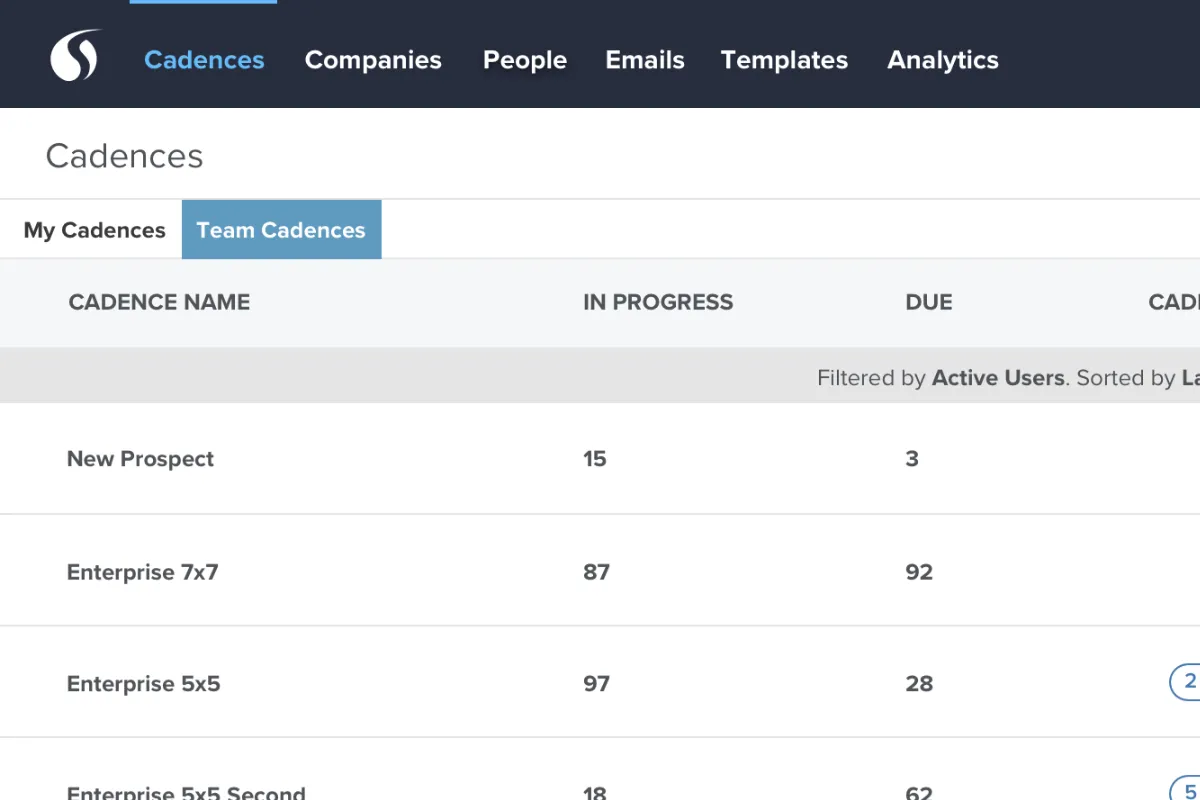
We debated the best way to surface these new Team Cadences to customers.
One list with Cadence type indicators. This was the first and most obvious approach. I liked keeping everything together in a list and using visual cues to indicate if it was a team Cadence. However, I was concerned about clutter, which was a significant concern for customers.
One list with filtering. This probably belongs with the first one. They aren’t mutually exclusive, but using filters to access or clean up a major feature wasn’t particularly appealing to anyone on the team.
My Cadences and Team Cadences tabs. We had structure for tabs elsewhere in the app, so perhaps we could include it here. When showing off a few concepts in an All-Hands meeting, several salespeople liked that this feature was front and center in the UI. It would be easy for them to discuss and sell.
Ultimately, it seemed like the tabbed approach was the best way forward.
Cadence Type
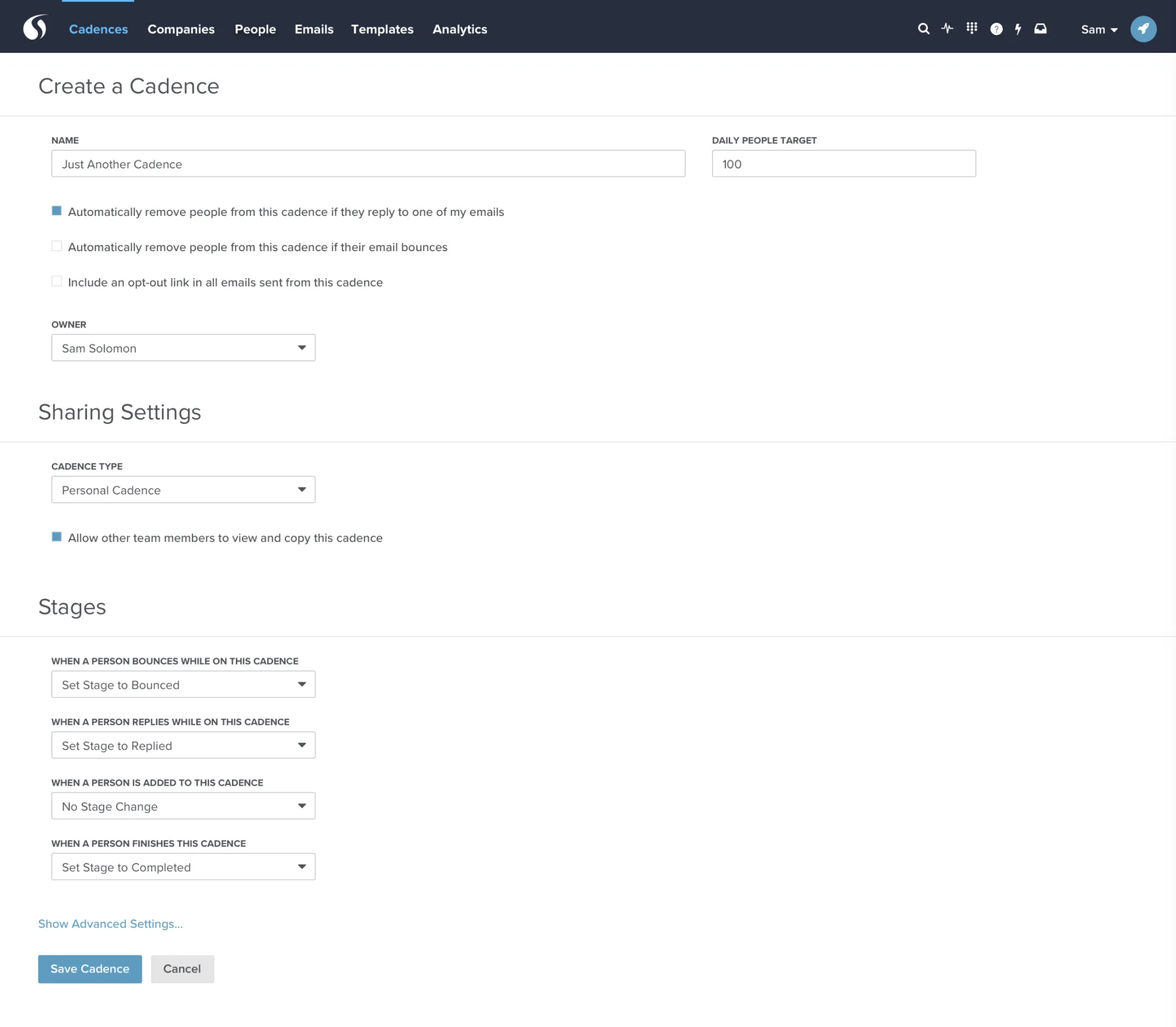
We had to make a few tweaks to the create Cadence flow. We needed to add a selector for team Cadences, which gave us an opportunity to do some additional cleanup.
Previously, the page was just a long list of form fields. I decided that we could make the create flow feel a little more manageable by breaking it into clear sections.
Core information—Cadence name, removal rules, and owner.
Sharing for Cadence type and publicity settings for personal cadences.
Stages for stage change adjustments.
Add to Cadence Flow
What about adding people to a team Cadence?
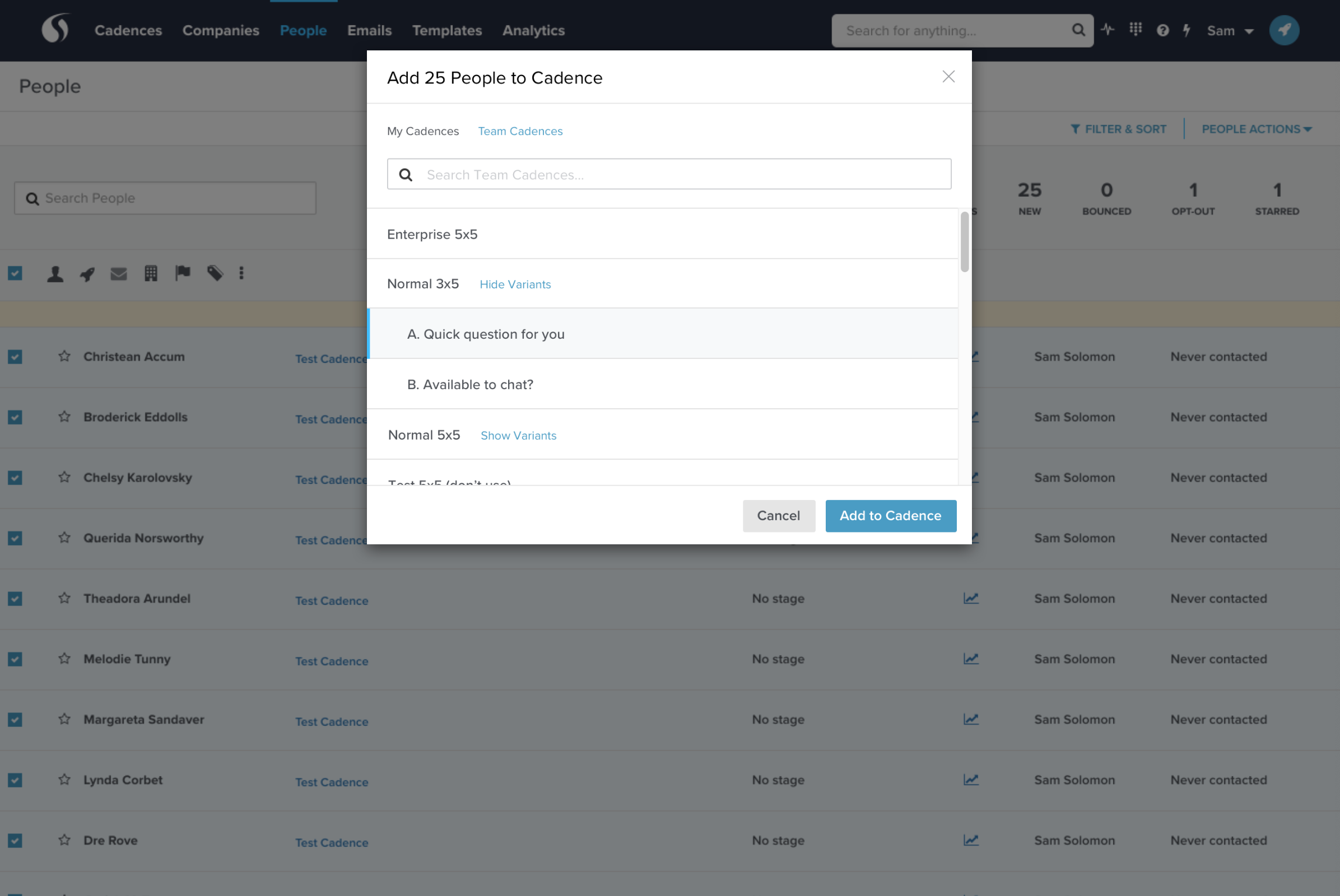
That was also covered in this project. The Add to Cadence modal now includes tabs for users to select My Cadences or Team Cadences.
There was also a new challenge—preventing duplicate outreach. As our customers grow larger, more sellers are on the platform. We wanted to prevent different sellers from contacting the same user.
You might not think that would be likely to happen, but with bulk actions, it’s pretty easy. Sure, if sellers just checked the activity feed, they would see another seller’s outreach. I don’t like waiting until the last minute for a user to make corrections, especially if the error is preventable.
The solution here was to add one additional confirmation modal in the add to Cadence flow. If we detect that a user is already on a Cadence, we give you the option to add only new people or add everyone.
Results
The goal here was to meet the needs of our enterprise customers: to build a solution for them to manage and execute Cadences as a team, not as individual sellers.
Team Cadences have only been out for a few weeks, but our enterprise customers are extremely happy with the solution. This is one of the biggest features I’ve worked on, and I’m not sure I’ve ever seen a launch go so smoothly.
Here’s to the PMRS team for delivering a rock-solid solution and helping serve our enterprise customers!